

DJ.STUDIO DJ.STUDIO Ultimate | Daw For Dj's | Download Code
- Catalog #: 11-44023
- DOWNLOAD CODE
DJ.Studio Ultimate
Create mashups, DJ mixes, radio shows, video mixes or prepare live sets in a fraction of the time
Prepare DJ sets, craft radio shows, and create stunning video mixes with unmatched speed and precision—all from your laptop, no hardware needed.
DJ.Studio Ultimate 4.0 enhances your entire DJ workflow with faster editing, improved stem separation, intelligent beat detection, and powerful video and audio tools, making it perfect for professional DJs and content creators. Whether you’re performing on the biggest stages or creating high-quality video mixes for online distribution, DJ.Studio Ultimate gives you everything you need to maximize your creativity and productivity.
Super fast DJ Mixing and Mashing with zero live fails
Create Your Playlist
- Import music from local libraries including iTunes, rekordbox, Serato, VirtualDJ, Mixed In Key, Engine DJ, Traktor, or browse local files (MP3, WAV, AIFF, FLAC, and more).
- Integrated Beatport & Beatsource support allows previewing tracks before purchase.
- Automatic search across Beatport and Beatsource when pasting Spotify or Apple Music URLs.
- Charts tab provides enhanced music discovery.
AI-Powered Playlist Ordering Assistant
- Harmonize your playlist using millions of calculations to perfectly order tracks by tempo and key.
- Automix ensures musically cohesive transitions, avoiding awkward clashing keys.
- Beat-sync tracks automatically for a flawless DJ mix with a consistent groove.
Refine Your Transitions
- Pixel-perfect timeline with improved color schemes and visibility.
- Default and custom transition presets with curves for volume, EQ, and effects.
- Enhanced drag-and-drop volume fade controls using white-square handles.
- Better visibility for cuts, duplicates, and track sections.
Manual Automation Editor
- Control any parameter through the flexible timeline system.
- Stack effects, EQ, volume, and other automation controls simultaneously.
Edit Your Tracks
- Cut, duplicate, or move sections to create unique, customized mixes.
- Redesigned beat grid editor allows precise individual beat adjustments, stabilizing tempo, and overall grid control.
- “Stabilize Tempo” feature corrects tempo variations for tighter mixes.
Enhanced Stem Separation
- 4 new stem models for higher-quality separation of vocals and instruments.
- Faster processing: Windows 3x–10x, Mac M1 75% improvement.
- Stems cover entire tracks, with volume automation lines per stem.
- Color-coded stem waveforms for clarity.
- Fully compatible with Vinyl mode for scratch and deck control.
Make Mashups and Remixes
- Slice and isolate drums, bass, melody, and vocals for mashups or extended edits.
- High-quality vocal isolation for backing tracks or independent project use.
- Improved Mashup mode: better track dragging, beat grid snapping, and workflow speed.
Extra Sample Lanes
- Add custom samples and sound effects for personalized mixes.
- Loopcloud integration remains, including the free sample pack and 60-day trial.
Audio-Reactive Visuals for Video Export
- Add audio-reactive visuals for immersive video mixes.
- Customize animations, transitions, album art, text, and effects.
- Over 100 reactive animations and 30,000+ 3D Shadertoy graphics included.
Power Up Your Sound with VSTs
- Integrate VST and AU plugins at any stage of your workflow.
- Use plugins for creative sound design, mashups, transitions, balancing, and mastering.
Professional Export Options
- Export mixes as MP3, WAV, or high-quality video files with chapter info for YouTube.
- Rekordbox export includes track edits.
- Serato export supports hot cues and track edits.
- Ableton export for additional mixing and mastering.
- Higher bit depth options for WAV and FLAC export.
- Import Mixmeister projects.
Beat Detection
- AI-powered beatgrid detection ensures precise alignment even for swing, groove, or complex breakbeats.
- Enhanced 4.0 beat grid editor provides tempo stabilization, beat adjustment menus, and overall improved workflow.
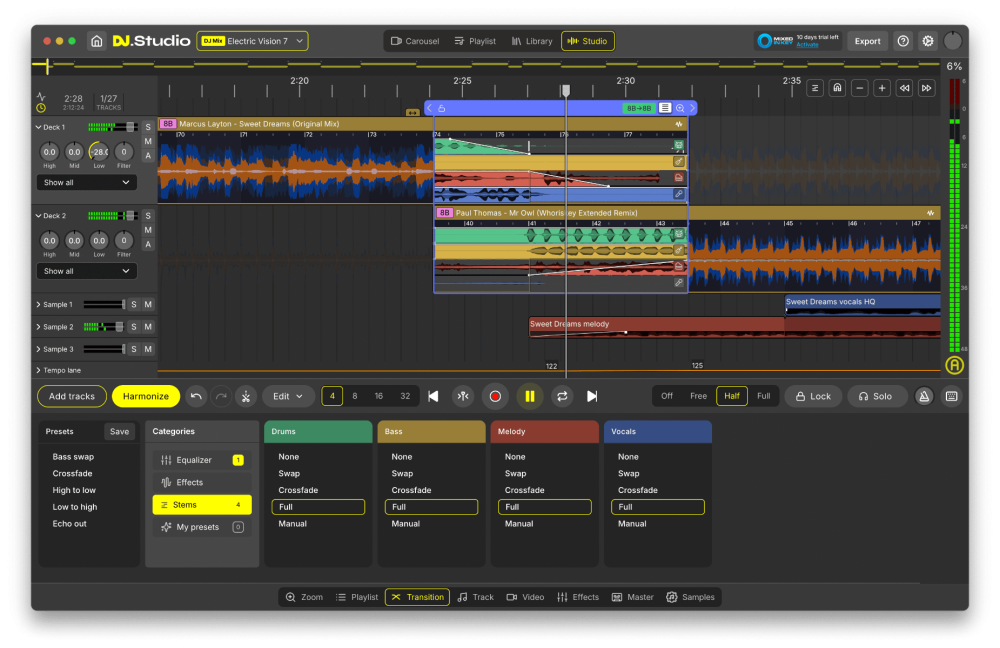
Studio View
- Change BPM
- Edit your transitions
- Default and custom transition presets
- Apply manual automations
- Add video visuals
- Add your own samples
- Add VST effects
- Stem-separated transitions
- Make mashups and re-edits with stem separation
- Split acapella and instrumental parts from tracks
- Export: MP3, WAV, high-quality video files, DJ Set (M3U), Mixcloud, Ableton live
- Re-pitch audio
Supported Libraries
- Local file downloads
- rekordbox, Mixed In Key, Serato, Engine DJ, Virtual DJ, Apple Music, Traktor Pro, iTunes
Features
- Automix
- Drag and drop tracks
- Supported file types for import: WAV/AIFF/AIF/M4A/FLAC Work offline Intuitive mix editor EQ effect blocks can now be saved as presets
Tech Specs
- MAC
- OS X OS X Big Sur 11 or higher
- Memory: 16 GB
- Disk: 4 GB
- CPU: Core processor Intel newer than 2017 or Silicon
- WINDOWS
- Windows Windows 10 or higher
- Memory: 16 GB
- Disk: 4 GB
- CPU: Core processor Intel or AMD newer than 2017